
How to Detect User Country in Flutter Without Location Permission
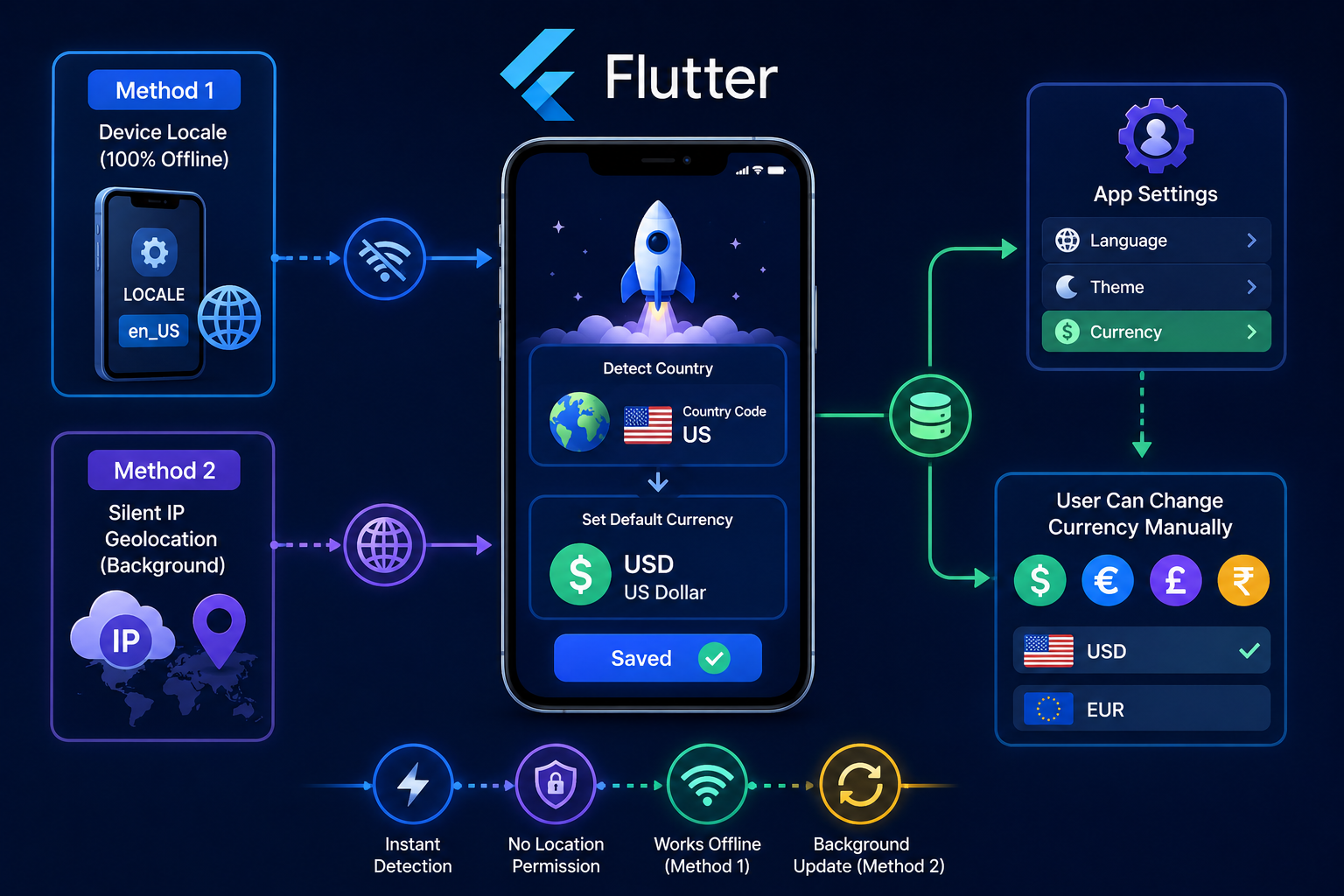
Flutter applications can determine a user’s country without requesting location permission. The device locale can provide the country code instantly and completely offline, while IP geolocation can be used as a background fallback when internet access is available.
Introduction
Many applications need to know the user’s country when they are opened for the first time.
This information can be used to select a default currency, configure regional settings, display appropriate content, select a language, or apply country-specific application settings.
A common approach is to request location permission and use GPS coordinates to determine the country. However, location permission is not necessary when the application only needs to know the user’s country.
Flutter applications can determine the country without requesting access to the device’s physical location.
There are two useful approaches for this requirement.
The first approach uses the device locale and country code. This method works offline, does not require any permission, and provides the result immediately.
The second approach uses IP geolocation. When the application has internet access, it can send the public IP address to an IP geolocation service and receive the estimated country information. This also does not require location permission, but it depends on network connectivity and the accuracy of the IP geolocation service.
For most applications, device locale should be the first method because it is fast, simple, private, and completely offline.
Why Location Permission Is Not Required
Location permission is required when an application wants to access the device’s physical location.
Country detection based on the device locale is different.
The operating system already maintains regional information such as language, country, and locale settings. Flutter can access the current system locale without requesting GPS or location permission.
Therefore, if the application only needs a country code such as US, IN, GB, AU, or CA, requesting location permission is unnecessary.
This also provides a better user experience because the application does not need to display a permission dialog during the first launch just to select a default currency.
Method 1: Device Locale and Country Code
Device locale is the recommended method for this requirement.
The operating system provides locale information that can contain both language and country information.
Flutter exposes this information through the platform dispatcher.
The country code can be accessed using:
import 'dart:ui' as ui;

String? getDeviceCountryCode() {
  return ui.PlatformDispatcher.instance.locale.countryCode;
}
The returned value can be used to determine the initial regional configuration.
The important advantage of this method is that it does not require internet access.
The application can determine the country immediately after startup, even when the device is completely offline.
Getting the Country Code Safely
The country code should not be assumed to always exist.
The application should handle the possibility that the locale does not provide a country code.
A safer implementation is:
import 'dart:ui' as ui;

String getDeviceCountryCode() {
  final countryCode =
      ui.PlatformDispatcher.instance.locale.countryCode;

  return countryCode?.toUpperCase() ?? '';
}
This provides a clean country code when the operating system provides one.
The application should also define a fallback country or configuration when the country code is unavailable.
Detecting the Country During First Launch
The country detection logic can be executed when the application starts.
A simple flow can be:
Future<void> setupDefaultCurrency() async {
  final countryCode = getDeviceCountryCode();

  final currency = getCurrencyFromCountry(countryCode);

  await saveCurrency(currency);
}
The application can call this logic during the first-launch setup before displaying the main application content.
The important part is to run this only when the user has not already selected a currency manually.
A user’s manual selection should always have higher priority than automatic detection.
Mapping Country Codes to Currencies
After obtaining the country code, the application needs to map it to a currency.
For a small number of supported countries, a simple map is sufficient.
const Map<String, String> countryCurrencyMap = {
  'US': 'USD',
  'IN': 'INR',
  'GB': 'GBP',
  'EU': 'EUR',
  'AU': 'AUD',
  'CA': 'CAD',
};
String getCurrencyFromCountry(String countryCode) {
  return countryCurrencyMap[countryCode] ?? 'USD';
}
For a production application with many countries, it is better to maintain a complete country and currency configuration rather than placing a large mapping directly inside the application logic.
Automatically Selecting the Default Currency
Once the country code is detected, the application can automatically select the corresponding currency.
The basic flow is:
Device Locale
     ↓
Country Code
     ↓
Currency Mapping
     ↓
Default Currency
     ↓
Save Locally
     ↓
Show Application
The application does not need to ask the user for permission during this process.
The currency can be selected automatically based on the device’s regional configuration.
Saving the Currency Locally
The automatically selected currency should be stored locally so that the application does not need to calculate it again every time a screen is opened.
The storage mechanism can be SharedPreferences, Hive, SQLite, or another local database depending on the application’s architecture.
A simple SharedPreferences implementation can look like this:
import 'package:shared_preferences/shared_preferences.dart';

Future<void> saveCurrency(String currency) async {
  final preferences =
      await SharedPreferences.getInstance();

  await preferences.setString(
    'selected_currency',
    currency,
  );
}
The saved value can then be used throughout the application.
User-Selected Currency Should Have Higher Priority
Automatic currency detection should only establish the initial value.
The user should always be able to change the currency manually.
The priority should be:
Manual Currency Selection
        ↓
Use User Selection

If No Manual Selection
        ↓
Check Saved Currency

If No Saved Currency
        ↓
Detect Device Country

Country Code
        ↓
Select Default Currency
This prevents the application from unexpectedly changing the user’s preferred currency later.
For example, if the device locale is changed after the user has manually selected another currency, the application should continue using the user’s selected currency.
Detecting First Launch
The application can store a flag indicating whether the initial currency setup has already been completed.
The logic can be implemented like this:
Future<void> initializeCurrency() async {
  final preferences =
      await SharedPreferences.getInstance();
  final hasCurrency =
      preferences.containsKey('selected_currency');

  if (hasCurrency) {
    return;
  }

  final countryCode = getDeviceCountryCode();

  final currency = getCurrencyFromCountry(countryCode);

  await preferences.setString(
    'selected_currency',
    currency,
  );
}
This prevents automatic detection from overriding an existing selection.
Method 2: Silent IP Geolocation
The second method is IP geolocation.
When the application has internet access, it can communicate with an IP geolocation service and retrieve information associated with the device’s public IP address.
The application does not need GPS permission for this.
The service determines an estimated geographical location from the public IP address and can return information such as country code, country name, region, city, and other network-related data depending on the provider.
An HTTPS API such as ipapi.co can be used for this purpose.
The important difference is that IP geolocation depends on the network connection, while device locale works without internet access.
Calling an IP Geolocation API
A basic request can be made using Flutter’s http package.
import 'dart:convert';
import 'package:http/http.dart' as http;
Future<String?> getCountryFromIp() async {
  try {
    final response = await http.get(
      Uri.parse('https://ipapi.co/json/'),
    );

    if (response.statusCode != 200) {
      return null;
    }

    final data = jsonDecode(response.body);

    return data['country_code']?.toString().toUpperCase();
  } catch (e) {
    return null;
  }
}
The returned country code can then be used as a fallback when the device locale does not provide enough information.
Combining Both Methods
Using both methods provides a more flexible country detection system.
The device locale should be checked first because it is immediate and does not require internet access.
IP geolocation can then be used as a fallback or as a background verification mechanism when internet connectivity is available.
The overall architecture can be:
App First Launch
       ↓
Check Saved Currency
       ↓
Already Selected?
   ↓           ↓
 Yes          No
  ↓            ↓
Use Saved   Check Device Locale
               ↓
          Country Code Found?
             ↓       ↓
            Yes      No
             ↓       ↓
       Select Currency
                     ↓
              IP Geolocation
                     ↓
                Country Code
                     ↓
              Select Currency
                     ↓
               Save Locally
This approach avoids unnecessary permission requests and provides an immediate default whenever the device locale contains a country code.
Background IP Detection
IP geolocation can also be performed after the initial application setup when internet connectivity is available.
The important point is that the request should not block the application’s first screen.
The application can first use the device locale and display the appropriate currency immediately.
The IP request can then run in the background if additional verification is required.
The result should only update the currency automatically when the user has not manually selected one.
This prevents a background IP response from unexpectedly changing the user’s selected currency.
Using WorkManager for Background Detection
If the application already uses WorkManager for background API synchronization, IP geolocation can also be included in a suitable background task.
The background task can perform the IP request when network connectivity is available.
A simplified setup can look like this:
@pragma('vm:entry-point')
void callbackDispatcher() {
  Workmanager().executeTask((task, inputData) async {
    try {
      final countryCode = await getCountryFromIp();

      if (countryCode != null) {
        await saveDetectedCountry(countryCode);
      }

      return true;
    } catch (e) {
      return false;
    }
  });
}
The background task should not override an existing manual currency selection.
Before applying the detected country, the application should check whether the user has already configured a currency.
Keeping Automatic Detection Separate From User Preferences
Country detection and currency preference should be treated as two different concepts.
The detected country is an automatic value.
The selected currency is a user preference.
For example, the application may detect one country from the device locale, while the user may intentionally choose another currency.
Once the user makes that selection, automatic detection should stop changing the currency.
A simple data structure can store this state:
class CurrencyPreference {
  final String currency;
  final bool isUserSelected;

  CurrencyPreference({
    required this.currency,
    required this.isUserSelected,
  });
}
The application can then determine whether a background detection result is allowed to update the current currency.
Handling Country and Currency Data
Country codes and currency codes should not be hardcoded throughout the application.
A centralized configuration makes the system easier to maintain.
For example:
class CountryCurrency {
  final String countryCode;
  final String currencyCode;

  const CountryCurrency({
    required this.countryCode,
    required this.currencyCode,
  });
}
const countryCurrencies = [
  CountryCurrency(
    countryCode: 'US',
    currencyCode: 'USD',
  ),
  CountryCurrency(
    countryCode: 'IN',
    currencyCode: 'INR',
  ),
  CountryCurrency(
    countryCode: 'GB',
    currencyCode: 'GBP',
  ),
];
The application can use this configuration from one location instead of maintaining separate country-to-currency logic across multiple screens.
Country Detection Does Not Mean Physical Location Detection
There is an important difference between these two concepts.
Device locale tells the application about the regional settings configured on the device.
IP geolocation estimates the network’s geographical location.
Neither method provides the same information as GPS-based physical location.
A user may configure a different country on their device, use a VPN, travel to another country, or connect through a network whose public IP is registered in another region.
Therefore, country detection should be treated as a way to determine a default regional preference rather than as a guaranteed physical location.
Handling VPNs and Network Differences
IP geolocation can produce different results depending on the network.
A VPN can cause the public IP address to appear to belong to another country.
Corporate networks, mobile carriers, proxies, and other network configurations can also affect IP-based country detection.
For this reason, IP geolocation should not automatically override a user’s existing currency preference.
Device locale is generally more appropriate for choosing the initial currency when the application is designed around the user’s configured regional preference.
Privacy Considerations
One advantage of device locale detection is that it does not send any information to an external service.
The country code is already available from the device configuration.
IP geolocation is different because the application makes a network request to an external service. The service can receive the public IP address and may process information according to its own privacy policy and terms.
The selected IP geolocation provider should therefore be reviewed before integrating it into a production application.
The application should also avoid sending unnecessary user information with the request.
Recommended Workflow
For most currency-based applications, the following workflow provides a good balance between speed and flexibility.
When the user installs and opens the application for the first time, the application checks whether a currency has already been saved.
If there is no saved currency, the application reads the device country code.
The country code is mapped to the appropriate default currency.
The currency is saved locally.
The application can then continue loading normally without waiting for an external geolocation API.
If additional IP-based verification is required, it can happen later when network connectivity is available.
If the user manually changes the currency from the Profile or Currency settings, that selection becomes the preferred value.
Future automatic country detection should not override the user’s manual selection.
Complete Detection Service
The main logic can be kept inside a dedicated service.
import 'dart:ui' as ui;
import 'package:shared_preferences/shared_preferences.dart';

class CountryCurrencyService {
  static const String currencyKey = 'selected_currency';

  static const Map<String, String> currencyMap = {
    'US': 'USD',
    'IN': 'INR',
    'GB': 'GBP',
    'AU': 'AUD',
    'CA': 'CAD',
  };

  Future<String> initializeCurrency() async {
    final preferences =
        await SharedPreferences.getInstance();

    final savedCurrency =
        preferences.getString(currencyKey);

    if (savedCurrency != null &&
        savedCurrency.isNotEmpty) {
      return savedCurrency;
    }

    final countryCode =
        ui.PlatformDispatcher.instance.locale.countryCode
            ?.toUpperCase();

    final currency =
        currencyMap[countryCode] ?? 'USD';

    await preferences.setString(
      currencyKey,
      currency,
    );

    return currency;
  }
}
This service keeps the initial currency detection in one place.
The application can call it during startup and use the returned currency throughout the application.
Updating Currency From Profile Settings
The automatic detection should only provide the initial value.
When the user opens Profile and changes the currency, the new value should be saved immediately.
The basic implementation is:
Future<void> updateCurrency(String currency) async {
  final preferences =
      await SharedPreferences.getInstance();

  await preferences.setString(
    'selected_currency',
    currency,
  );
}
After this value is saved, the application should use the selected currency instead of running automatic currency selection again.
Important Points for Production
Device locale detection is the preferred first method because it is instant and completely offline.
Location permission is not required for either device locale detection or IP-based country estimation.
IP geolocation requires internet access and depends on the accuracy of the external service.
The device locale should not be treated as proof of the user’s physical location.
IP geolocation should not be treated as a guaranteed physical location either.
VPNs, proxies, mobile networks, and corporate networks can affect IP-based results.
Manual currency selection should always have higher priority than automatic detection.
Background detection should never block the first screen of the application.
Automatic detection should not repeatedly overwrite the user’s preference.
Country and currency mapping should be maintained centrally.
Conclusion
A Flutter application does not need location permission just to determine a default country or currency.
The device locale provides a simple and reliable way to obtain the country code without requesting permission or using an internet connection. This makes it the recommended first method for applications that only need regional information.
IP geolocation provides another option when network access is available. It can be used as a fallback or as a background verification mechanism, but the result can be affected by VPNs, proxies, mobile networks, and other network conditions.
The best approach is to detect the device country during the first application launch, automatically select the corresponding currency, save that value locally, and allow the user to change it manually from the Profile or Currency settings.
Once the user selects a currency manually, that preference should always take priority over automatic detection.
This approach keeps the first-launch experience fast, avoids unnecessary location permission requests, works offline, and provides a flexible currency selection system that can be used throughout a Flutter application.