
How to Call APIs in the Background in Flutter Using WorkManager
Calling an API only when the Flutter application is open is not always enough for applications that need background synchronization. With the WorkManager package, Flutter developers can schedule background tasks that can run without opening the application and can require an active network connection.
Introduction
Many Flutter applications depend on APIs to keep application data synchronized with a backend server.
Normally, an API request is made when the user opens the application, visits a particular screen, refreshes the data, or performs an action. This works well for normal application functionality, but it becomes a problem when data needs to be synchronized while the application is not being used.
For example, an application may store pending transactions, orders, messages, forms, inventory changes, or other information locally when the device is offline. Waiting for the user to open the application before sending this data to the server can leave the backend with outdated information.
A background task can solve this problem by allowing the application to schedule synchronization work through the operating system.
In Flutter, the Workmanager package can be used to schedule background tasks. The task can also be configured with a network constraint so that the operating system waits for a suitable network connection before running the work.
It is important to understand that WorkManager does not provide an exact real-time trigger when the internet becomes available. The operating system controls when background work is executed.
In this article, we will understand how to implement background API synchronization in Flutter using WorkManager without requiring the user to manually open the application.
Understanding Background API Calls
A normal API call runs while the Flutter application is active.
When the application is closed, developers cannot depend on the normal Flutter UI lifecycle to perform background synchronization.
Background work needs to be scheduled through the operating system. WorkManager provides this functionality by allowing Flutter applications to register tasks that can be executed independently of the application’s normal UI flow.
The background task runs in a separate execution context, so it should not depend on widgets, BuildContext, or UI controllers.
The background implementation should contain only the logic required to perform the synchronization.
Why WorkManager Is Useful
WorkManager is useful when an application needs background work that does not have to execute at an exact time.
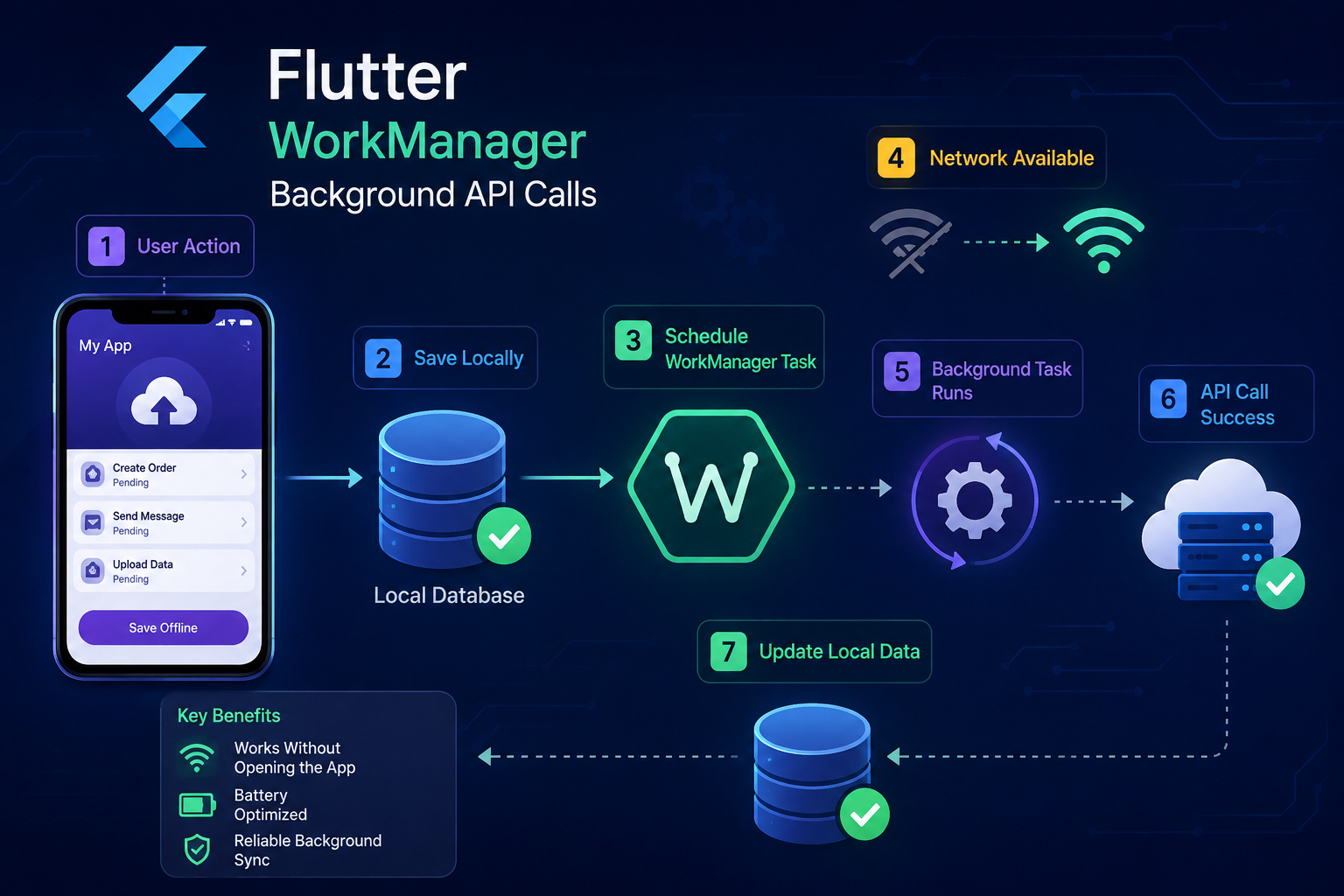
A typical synchronization flow can work like this:
User Action
    ↓
Save Data Locally
    ↓
Mark Data as Pending
    ↓
Register Background Task
    ↓
Network Becomes Available
    ↓
Background Task Executes
    ↓
Call API
    ↓
Update Local Data
    ↓
Mark Data as Synced
This architecture allows the application to continue working even when the device temporarily has no internet connection.
# Adding WorkManager
Add the Workmanager package to pubspec.yaml.
dependencies:
  flutter:
    sdk: flutter
  workmanager: ^0.9.0+3
  http: ^1.2.2
Then run:
flutter pub getThe package version should be checked against the Flutter SDK and the current project configuration before using it in production.
Creating the Background Callback
The background callback is responsible for executing the registered task.
The callback should be a top-level function because it can be invoked from a background isolate.
The important implementation is:
@pragma('vm:entry-point')
void callbackDispatcher() {
  Workmanager().executeTask((task, inputData) async {
    try {
      await syncPendingData();

      return true;
    } catch (e) {
      return false;
    }
  });
}
The @pragma(‘vm:entry-point’) annotation prevents the callback from being removed or renamed during compilation.
The callback should not directly access GetX controllers, widgets, BuildContext, or other UI-dependent objects.
Initializing WorkManager
WorkManager needs to be initialized when the application starts.
The required setup is:
Future<void> main() async {
  WidgetsFlutterBinding.ensureInitialized();
  await Workmanager().initialize(
    callbackDispatcher,
  );
  runApp(const MyApp());
}
This connects the WorkManager instance with the background callback.
After initialization, background tasks can be registered according to the application’s requirements.
Registering a Network-Based Background Task
If the API should run only when the device has a network connection, use a network constraint.
The important registration code is:
Workmanager().registerOneOffTask(
  'sync-pending-data',
  'syncPendingData',
  constraints: Constraints(
    networkType: NetworkType.connected,
  ),
);
The NetworkType.connected constraint tells WorkManager that the task requires network connectivity.
If the task is registered while the device is offline, the operating system can wait until the required network condition is available before running the task.
This removes the need to continuously check the internet connection from the Flutter application.
Running the API in the Background
The API request should be separated from the WorkManager registration logic.
A background API service can contain the required request:
Future<bool> syncPendingData() async {
  final pendingData = await getPendingData();

  for (final item in pendingData) {
    final response = await http.post(
      Uri.parse('https://example.com/api/sync'),
      headers: {
        'Content-Type': 'application/json',
      },
      body: jsonEncode(item.payload),
    );

    if (response.statusCode >= 200 &&
        response.statusCode < 300) {
      await markAsSynced(item.id);
    }
  }

  return true;
}
The worker can then call this service when the background task starts.
Keeping the API logic separate makes the application easier to maintain because the same service can be reused by the normal application flow and the background synchronization flow.
Running Without Opening the Application
The main purpose of this setup is to allow background synchronization without requiring the user to manually open the application.
Once a task has been registered, the operating system manages its execution according to the configured constraints and background execution rules.
For example, if the task requires network connectivity and the device is currently offline, the task can remain pending until the required condition becomes available.
The application UI does not need to be visible for the background callback to execute.
However, developers should not treat this as a real-time network listener.
The operating system decides when background work is allowed to execute.
Periodic API Synchronization
For applications that need regular synchronization, a periodic task can be registered.
The important configuration is:
Workmanager().registerPeriodicTask(
  'periodic-sync',
  'syncPendingData',
  frequency: const Duration(minutes: 15),
  constraints: Constraints(
    networkType: NetworkType.connected,
  ),
);
Periodic work is useful when the application needs to regularly refresh or synchronize data.
The execution time is controlled by the operating system, so a 15-minute frequency should not be interpreted as an exact API call every 15 minutes.
Background scheduling is designed around eventual execution rather than exact timing.
One-Off Background Synchronization
A one-off task is useful when a specific synchronization operation needs to be scheduled.
For example, after storing pending data locally, the application can register a one-off synchronization task.
Workmanager().registerOneOffTask(
  'pending-sync',
  'syncPendingData',
  constraints: Constraints(
    networkType: NetworkType.connected,
  ),
);
This approach is useful for offline-first applications where locally stored operations need to be uploaded when network connectivity becomes available.
Local Database and Pending Data
Background API synchronization becomes much more reliable when pending information is stored in a local database.
When an API request cannot be completed because the device is offline, the application can store the request locally.
The record can contain information such as the request identifier, request payload, creation time, synchronization status, and retry information.
The background worker can then read pending records and send them to the backend.
After a successful API response, the local record can be marked as synchronized.
This prevents data from being lost when the application does not have an internet connection.
Handling Authentication
Background API requests may require authentication.
A common mistake is to access an authentication controller directly from the background task.
For example, the background task should not depend on a UI controller for retrieving a token.
The required authentication information should be stored in persistent storage that can be accessed by the background execution environment.
The background task can then retrieve the required token and attach it to the API request.
The authentication architecture should also handle expired tokens because a background task may execute much later than the time at which it was originally scheduled.
Handling API Failures
A background task should always assume that an API request can fail.
The server may return an error, the network may become unavailable, authentication may fail, or the backend may temporarily be unavailable.
The local record should remain pending when synchronization fails.
The background task can then return an unsuccessful result so that the work can be retried according to the platform’s scheduling behavior.
A synchronization operation should never mark data as completed before the server has successfully processed the request.
Preventing Duplicate Requests
Background tasks can sometimes be executed again after a previous attempt.
This means important API operations should be designed to handle duplicate requests safely.
For transactions, orders, payments, inventory changes, or other critical operations, the application should send a unique identifier with the request.
The backend can use this identifier to determine whether the operation has already been processed.
This prevents the same operation from being created multiple times if the background task is retried.
Using WorkManager With GetX
GetX can continue to manage the application’s normal UI state, but the background task should not depend directly on GetX controllers.
The API and synchronization logic should be moved into a service or repository layer.
For example:
class SyncService {
  Future<bool> syncPendingData() async {
    // Local database
    // API request
    // Update synchronization status

    return true;
  }
}
The normal GetX controller can use the service when the application is open.
The WorkManager callback can use the same synchronization logic when the application is running in the background.
This separation creates a cleaner architecture and avoids connecting background work directly to the UI lifecycle.
Keeping Background Tasks Lightweight
Background tasks should complete their work as efficiently as possible.
A synchronization worker should read the required data, perform the API requests, update the local database, and finish.
It should not be used as a replacement for a permanently running service.
Continuous location tracking, real-time communication, long-running processes, and other specialized background requirements may require different platform-specific solutions.
Android Background Restrictions
Modern Android versions place restrictions on background execution to reduce battery consumption and improve system performance.
WorkManager is designed to operate within these restrictions.
The operating system can delay background work because of battery optimization, Doze mode, device state, scheduling conditions, and other system-level factors.
For this reason, applications should not depend on exact background execution times.
The synchronization process should be designed so that delayed execution does not cause data loss or incorrect application state.
iOS Background Execution
iOS has its own background execution rules and limitations.
Even when using Workmanager, developers should not assume that background execution will behave exactly like Android.
The operating system controls when background work can run.
The iOS implementation should therefore be tested separately on physical devices, especially when the application depends on background synchronization for important functionality.
Testing Background Synchronization
Background functionality should be tested on real devices.
The application should be tested while the device is connected to Wi-Fi, connected to mobile data, offline, switching between networks, running with battery-saving settings, and after the device has been restarted.
The API server should also be tested for successful responses, server errors, authentication failures, and temporary connectivity problems.
Testing only while the application is open is not enough because background execution follows different platform rules.
Important Limitation of Network Constraints
Network constraints do not mean that the API will execute immediately when the internet becomes available.
For example, if the device is offline and the network becomes available later, WorkManager may still wait before executing the task.
This is controlled by the operating system.
The purpose of the network constraint is to tell the scheduler that the task requires network connectivity. It is not a guarantee of immediate execution.
Therefore, WorkManager is suitable for background synchronization but should not be used when an operation must happen in real time.
Recommended Architecture
A clean architecture for background API synchronization can look like this:
Flutter UI
    ↓
GetX Controller
    ↓
Repository / Service
    ↓
Local Database
    ↓
Pending Data
    ↓
WorkManager
    ↓
Network Constraint
    ↓
Background Isolate
    ↓
API Service
    ↓
Backend
    ↓
Update Local Database
The Flutter UI handles user interaction.
GetX manages the application state.
The repository or service handles API communication.
The local database stores pending operations.
WorkManager schedules background execution.
The API service communicates with the backend.
The local database is updated after successful synchronization.
This separation keeps the background process independent from the application’s UI.
When WorkManager Is a Good Choice
WorkManager is suitable when an application needs background work that can be executed later.
It can be useful for offline data synchronization, pending transaction uploads, order synchronization, inventory updates, background data refresh, queued API requests, and similar operations.
It is especially useful when the application can tolerate some delay between the time the network becomes available and the time the synchronization actually happens.
Conclusion
Background API synchronization is an important requirement for many Flutter applications that work with local databases and remote APIs.
Using WorkManager, developers can schedule background tasks without requiring the user to open the application manually. Network constraints can be added so that the background work requires a suitable network connection before execution.
A reliable implementation should keep background logic separate from the UI, store pending data locally, handle authentication correctly, manage API failures, prevent duplicate requests, and safely retry synchronization when required.
The most important thing to remember is that WorkManager is not a real-time network listener. The operating system controls background execution, so the application should be designed for reliable eventual synchronization rather than exact execution timing.
When this architecture is implemented correctly, Flutter applications can continue synchronizing important data in the background while providing a better experience for users who do not need to repeatedly open the application just to trigger API requests.